All posts
An electrical riser diagram shows how power moves from the service to every panel on a project and where each piece of equipment sits along the way. Traditionally it is drawn floor by floor up a multi-story building, and it appears in most commercial and multifamily permit sets, where it is often the one sheet the plans examiner, estimator, and field crew all work from.
This guide covers what a riser diagram shows, how it differs from a single line diagram, when one is required, and how to draw and label one for plan review.
On this page
- What is an electrical riser diagram?
- What is a riser diagram used for?
- When is a riser diagram required?
- Common riser diagram symbols
- Riser diagram templates and examples
- How to draw an electrical riser diagram
- Why riser diagrams get rejected in plan review
- Drawing a riser diagram in Kopperfield
- FAQ
What is an electrical riser diagram?
While the textbook, or strict, definition of a riser diagram is a vertical, floor-by-floor schematic of a multi-story building, in the field the term is used much more broadly. A riser diagram can refer to any specialized single line diagram that organizes the electrical system by physical location, whether across different floors, buildings, or areas of a site.
Instead of showing only logical electrical connectivity, it maps the distribution system by anchoring components to physical zones:
- Floors (vertical layout). The diagram is divided by level to show how power travels up or down through a multi-story building.
- Wings or zones (horizontal layout). The layout is segmented by wing, campus, or zone (for example, North Wing vs. South Wing) to show how power spans a large, flat facility.
- Boxes or boundaries (separate structures or areas). Clear enclosures on the page isolate and define parts of a site, specific rooms, or process areas.
Whether it tracks vertical floors or horizontal zones, practitioners use "riser diagram" to describe a single line diagram arranged so an inspector, electrician, or engineer can see where equipment sits and how power physically moves across a project site.
What is a riser diagram used for?
A riser diagram provides a clear overview of how electrical equipment is connected and how power is distributed through a building or site. Because it is schematic and not drawn to scale, it shows where equipment sits relative to floors and zones, not measured distances or conduit routing.
- Permit review. A plans examiner can use the riser diagram to understand the distribution path from the service to downstream equipment and compare it with the load calculation and other electrical documentation.
- Equipment and feeder information. When equipment is consistently labeled, the riser diagram provides a quick reference for equipment ratings, service ratings, AIC ratings, conductor sizes, conduit sizes, and other electrical specifications. It can also make it easier to check that equipment ratings are appropriate throughout the system.
- Utility coordination. For new services and service upgrades, a riser diagram can provide the utility with a clear overview of the service arrangement and how it connects to the rest of the electrical system.
- As-built record. A well-maintained riser diagram can serve as a useful record of the completed electrical system. When equipment is added or modified later, the diagram gives the next contractor a starting point for understanding the existing distribution and connections.
When is a riser diagram required?
A riser diagram is typically required on commercial and multifamily permit sets, service upgrades, and tenant improvements where the distribution path changes. That includes multi-metered buildings, generator and transfer switch installs, PV and battery interconnections, EV charger banks, and feeders to detached structures. The AHJ sets the requirement, so it varies by jurisdiction. Single-family work with one service and one panel rarely needs one, and neither does a like-for-like panel swap or adding circuits with no feeder change. Generator and solar jobs are the common exception: both add a source to the service, so the AHJ or the utility often wants a riser diagram even on a house.
To confirm, check the building department's electrical submittal checklist and the utility's service application. The utility often wants a riser diagram even when the AHJ does not, because it needs to see the service size, metering, and any generator connected to its system. If you cannot get an answer, include one anyway.
Common riser diagram symbols
Electrical riser diagrams commonly use symbols for panelboards, meters, disconnects, circuit breakers, grounding, transformers, switchboards, transfer switches, and generators. Because there is no universal symbol set, conventions vary by shop and jurisdiction.
What carries the drawing is the electrical information beside each symbol: equipment ratings, service ratings, AIC ratings, and the conduit runs with their sizes. Because a riser diagram shows physical connections, label the run between each piece of equipment and describe both the conduit and the conductors it carries. Where you show AIC ratings, note the available fault current at the service too, since NEC 110.24 requires that value to be field-marked on service equipment at other than dwelling units, and you can calculate it in Kopperfield's fault current calculator.
If it helps, include the load calculation, service size, or calculated amperage on the riser diagram. You can run that calculation in Kopperfield's load calculator, or any load calculator you already use.
The table below shows the most common symbols, how they are typically drawn, and the information usually shown beside them.
| Equipment | How it is typically drawn | What is usually labeled |
|---|---|---|
| Panelboard | A rectangle with the panel name inside | Panel name, ampere rating, main breaker or main lugs only |
| Meter | A circle with "M" or "Meter" inside, often in a square socket | Meter ID; current transformer metering shown with a separate cabinet |
| Disconnect | A rectangle, or a switch symbol with the blade drawn open | Ampere rating, fused or non-fused |
| Circuit breaker | A small square on the line, or an arc across it | Trip rating and number of poles |
| Grounding | Three stacked horizontal lines, getting shorter toward the bottom | Grounding electrode conductor size, when shown |
| Feeder tag | A numbered or lettered diamond or hexagon on the line | Keyed to a wiring schedule or notes table on the same sheet |
| Transformer | Two circles or coil shapes side by side | kVA rating, primary and secondary voltages |
| Switchboard | A rectangle, often wider than a panel, sometimes with the bus and main breakers drawn inside | Name, ampere rating, voltage |
| Transfer switch | A rectangle with separate normal and standby feeds coming in | Ampere rating, automatic or manual |
| Generator | A circle with "G" inside | kW rating, voltage, fuel type |
Whichever symbols you use, define them in the key on the sheet. A plans examiner can read an unfamiliar symbol as long as the key explains it. Mixing styles on the same sheet, or leaving a symbol undefined, is what causes confusion.
Electrical riser diagram templates and examples
Most riser diagrams use one of two layouts. A vertical riser diagram is divided by floor. A horizontal riser diagram is divided by zone, or follows the path power takes across the site. The four examples below cover both layouts, across a transfer switch install, a multifamily panel replacement, a solar interconnection, and a standby generator.
Each of these examples is available as a free riser diagram template. Browse the library in Kopperfield's single line diagram tool and pick one similar to your project, or build one from scratch. Swap in your own equipment, ratings, and floors or zones, and export a PDF for your permit set. A free account covers two diagrams. Starting from a template that already matches your layout is faster than drawing from a blank sheet, and it keeps the floor lines, zone divisions, and title block in place.
Vertical riser diagram – 400A ATS install for 200A generator feeder
A two-level sheet for a new 400A service-rated automatic transfer switch. The floor line splits main floor from basement, so the reviewer can see the utility service and the generator feeder coming up from below while the transfer switch, meter, and existing wireway sit on the main floor. Conduit and conductor callouts sit beside each run, including the tie to the existing grounding electrode system.
Edit this single line diagram template
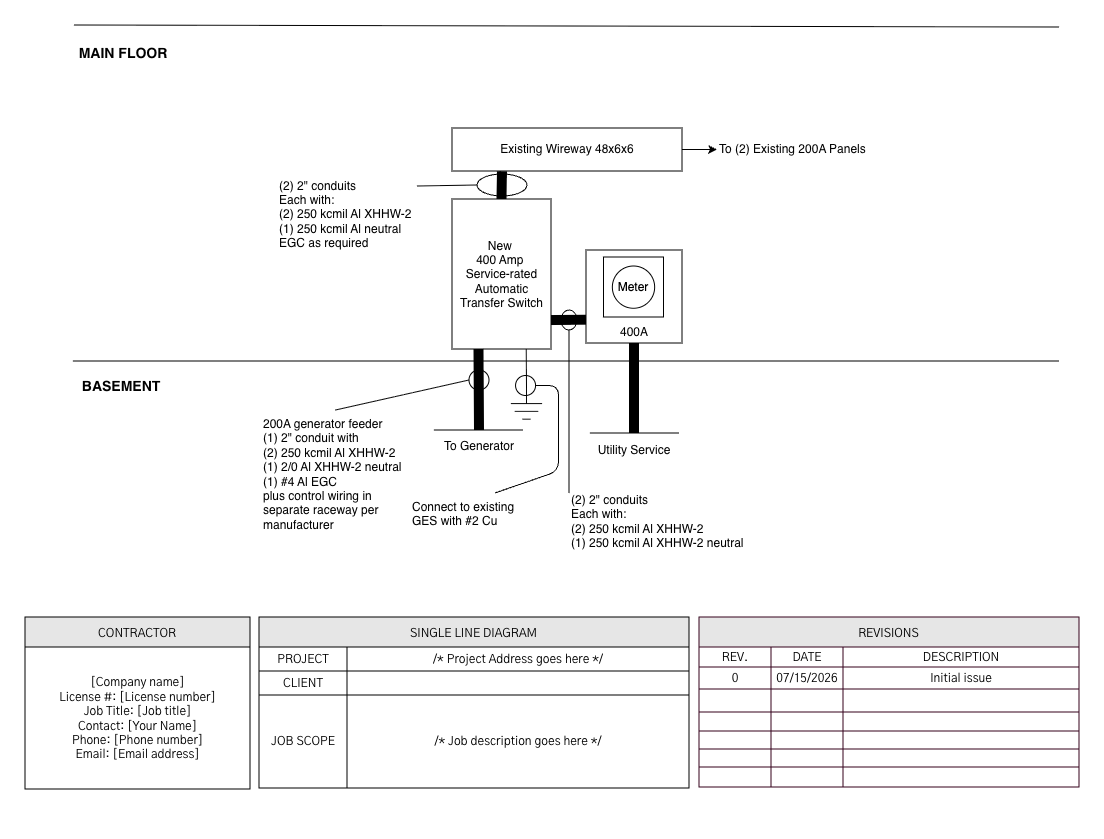
Main floor and basement bands. The line across the sheet shows which runs come up from below.
Vertical riser diagram – 4-story apartment building panel replacement
A 4-story building with a meter bank on the main floor. Meters A through D each feed a unit panel on the floor it serves, and meter E feeds the house and common panel. The scope is a new 200A panel for Unit 401, and drawing it against the whole building shows the reviewer how the new feeder fits with the existing ones.
Edit this single line diagram template
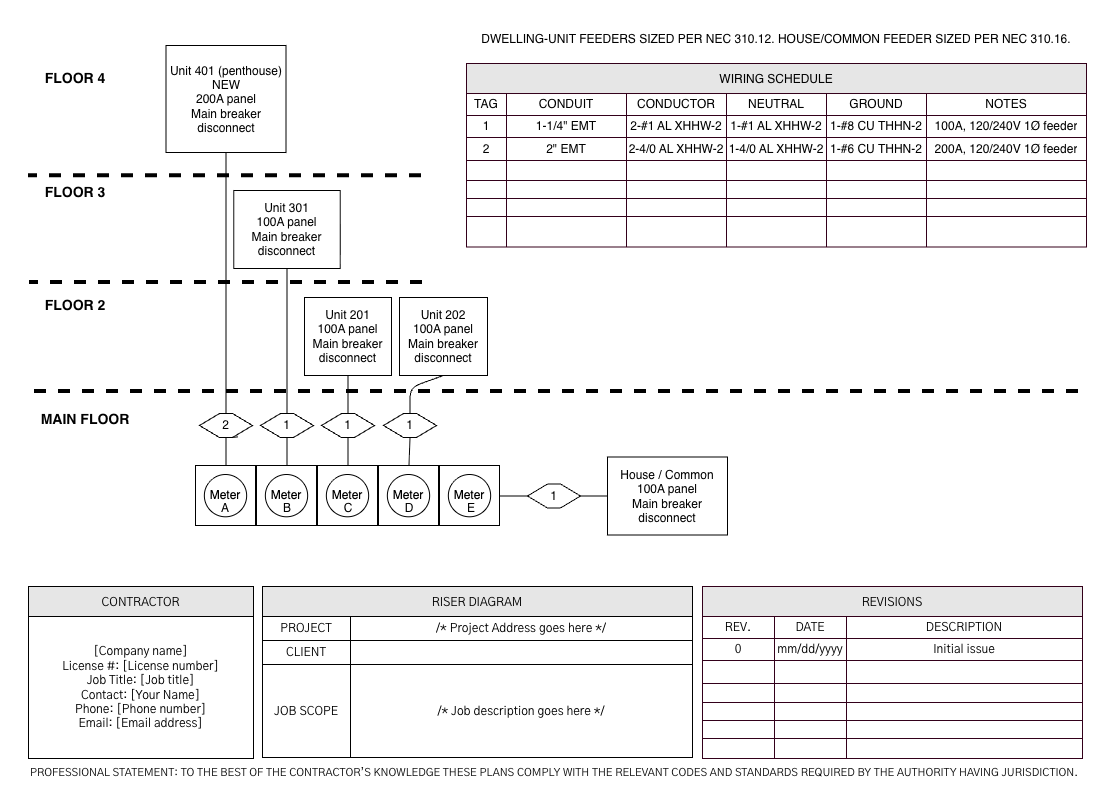
Floors 2 through 4 stacked above the meter bank, with every feeder tag keyed to the wiring schedule on the same sheet.
Horizontal riser diagram – residential solar
A rooftop array tied into an existing 200A service. Dashed lines divide the sheet into the house roof, the garage, the house exterior, and the street, so the reviewer can follow the run from the panels through the combiner panel and the lockable AC disconnect to the main panel's backfeed breaker. Grounding runs to both a concrete-encased electrode and ground rods.
Edit this single line diagram template
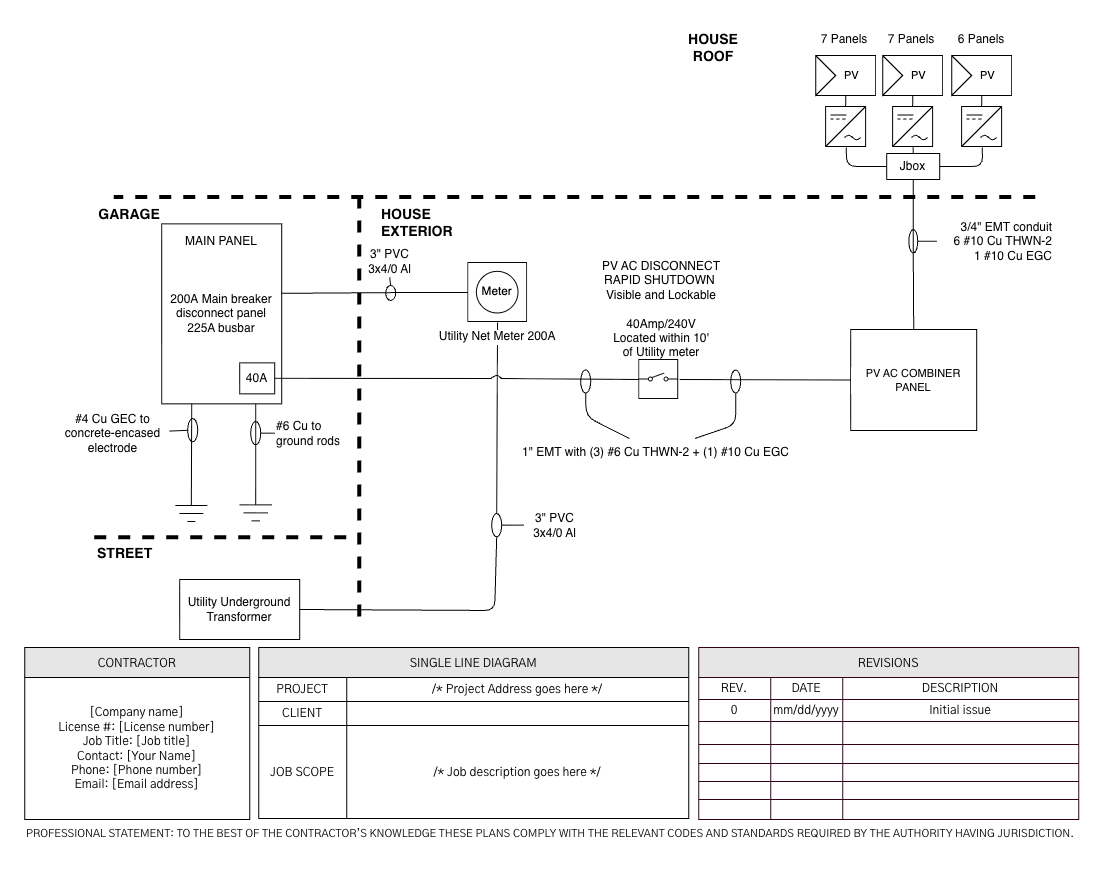
Zones instead of floors, running from the roof down to the utility transformer at the street.
Horizontal riser diagram – generator install or replacement
Nothing on this job is stacked by floor, so dashed lines divide the sheet into the west exterior wall, the garage interior, and the east exterior wall instead. The reviewer can see where the main panel, automatic transfer switch, service disconnect, meter, and standby generator each sit, and which runs cross between them. A note carries the dwelling load against the generator's output, and every tagged run is keyed to the wiring schedule.
Edit this single line diagram template
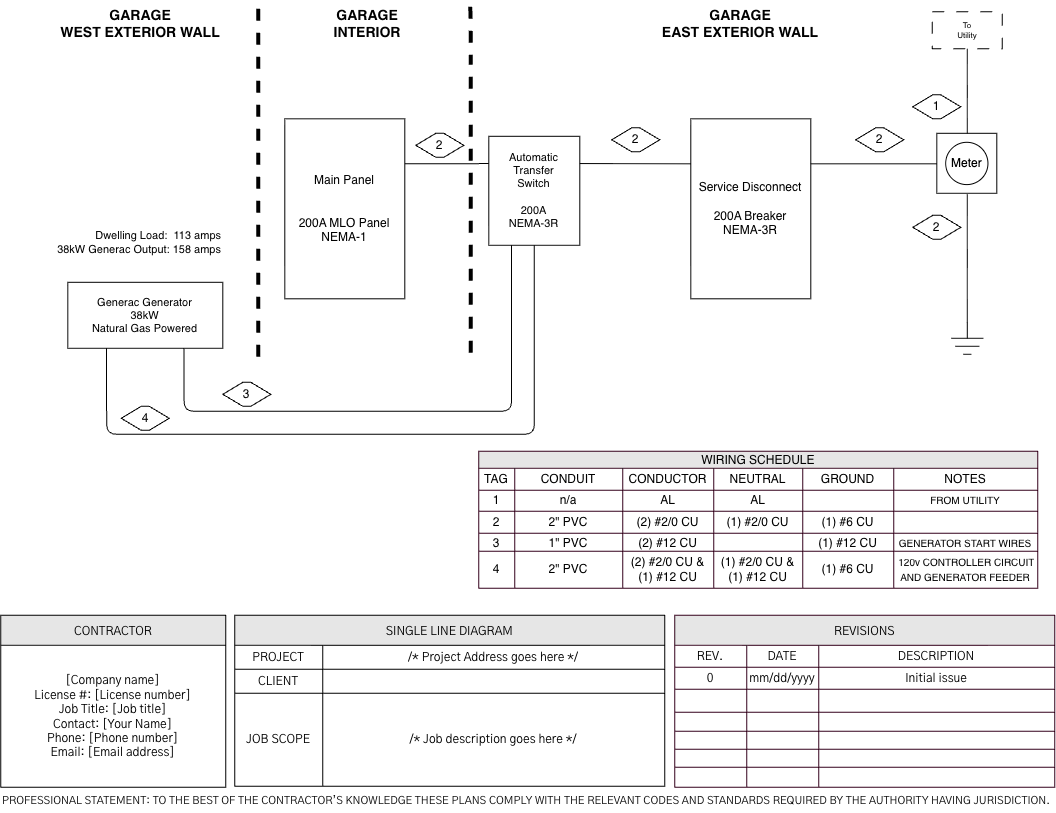
Zone bands rather than floor lines, with the dwelling load noted against the generator's output.
How to draw an electrical riser diagram
To draw an electrical riser diagram, start at the service, divide the sheet by floor or zone, then run and label every feeder and piece of equipment in the order power reaches it. What belongs on the sheet depends on the job and the reviewer, but the method is the same:
- Start with the AHJ's requirements. Check what that jurisdiction wants on the sheet before you draw, and think about what a future electrician should be able to understand from it.
- Pick the organizing axis. Floors for a multi-story building, wings or zones for a site that spreads out horizontally, boxes for separate structures and process areas.
- Start at the source. Put the point of service at the bottom of the sheet on a multi-story riser diagram, or at one edge on a zoned layout, and work outward in the order power reaches equipment.
- Draw the zone divisions. Floor lines, wing bands, or boundary boxes, labeled to match the names in the architectural set.
- Run and label the feeders. One line per feeder, identified by what it is and what protects it, with the conductor and conduit sizes on every run.
- Label the equipment and key the sheet. Use the same names as your panel schedules so the two sheets agree, and tag each run to a wiring schedule on the same sheet. Anything a reviewer could read two ways belongs in the key.
- Check it against the rest of the set. Panel names, feeder sizes, and the service rating should match the panel schedules and the load calculation.
Kopperfield's single line diagram tool handles each of these steps: place equipment from an electrical symbol library, arrange it by floor or zone, label feeders and panels, and export a PDF for the permit set.
Why riser diagrams get rejected in plan review
Most riser diagram corrections come from missing or unclear information, not from the layout itself. Plans examiners also reject for real code problems the sheet puts in front of them, like a feeder undersized for the load it serves or overcurrent protection that does not match the conductors it protects. There is no single standard for laying out a riser diagram. Format varies from one electrical shop to the next, and what gets flagged depends on the plans examiner and the jurisdiction. The goal is always the same: the plans examiner should be able to read the sheet, follow the power path from the service to every panel, and match it to the rest of the permit set without guessing.
What makes a riser diagram easy to interpret
- The path reads in order. Equipment is drawn in the order power reaches it, whether the source sits at the bottom of a multi-story riser diagram, at one side of a zoned layout, or somewhere else that suits the job. If the plans examiner can trace it without backtracking, the layout works.
- Every connection is clear. Each line starts and ends at a labeled piece of equipment. No feeder stops in open space, and no panel has a feeder coming in with nothing showing where it came from.
- Floors and zones are labeled. Level lines, wing bands, or boundary boxes carry names that match the architectural set, so the plans examiner knows where each piece of equipment sits.
- The key explains anything unfamiliar. Symbols and abbreviations vary by shop, so a custom one is fine as long as the key on the sheet defines it.
- The sheet agrees with the rest of the set. Panel names, feeder sizes, and ratings match the panel schedules and load calculation, so the plans examiner is not left reconciling two versions of the same system.
Common corrections
Each AHJ has its own checklist and priorities, but these comments come up often because they leave the plans examiner unable to confirm something:
- Panel names that do not match the panel schedules
- Feeder sizes left off
- Equipment ratings missing from the service and distribution equipment
- Grounding not shown
- Floors or zones unlabeled, so the arrangement is ambiguous
- Emergency and normal power combined on one riser diagram in a jurisdiction that wants them shown separately
Before you draw, check the AHJ's submittal checklist or a recent correction notice from the same jurisdiction. It is the fastest way to learn what that plans examiner needs to see.
Drawing a riser diagram in Kopperfield
You can draw an electrical riser diagram in Kopperfield's single line diagram tool, starting from a free riser diagram template or a blank sheet. It works from a library of electrical symbols rather than generic shapes, so labels and ratings stay attached to the equipment as you move it. Place the service, meter, transformer, transfer switch, and panels, arrange them by floor or zone, label the feeders, and export a PDF to submit with the permit application.
👉 Draw a riser diagram in Kopperfield
Frequently asked questions
Riser diagram vs single line diagram: what is the difference?
A riser diagram is a type of single line diagram. Both use a single line to represent conductors, but the riser diagram is arranged by physical location, so where equipment sits is visible on the sheet. A general single line diagram is arranged by electrical relationship instead. Reach for a riser diagram when the reviewer needs to see how power moves through the building; on a single-story building with one panel, a single line diagram is usually enough.
Do I need both a riser diagram and a single line diagram?
Not always. On most small permit sets, one sheet covers both. On larger commercial and multifamily sets, some jurisdictions ask for a single line diagram with full protective device detail alongside the riser diagram.
Why does my AHJ want a PV single line diagram instead of a riser diagram?
Both are single line diagrams. For a solar or battery interconnection the reviewer is checking the PV equipment and where it ties into the existing service, so the request is usually for a sheet scoped to that path rather than to the building's distribution. One sheet often covers both on a residential job, which is what the solar example above does. Where the AHJ publishes a PV-specific checklist, follow it.
Is a riser diagram drawn to scale?
No. A riser diagram is schematic. It shows the order and rough position of equipment, not measured distances. Floor plans carry the scaled locations.
What software do electricians use to draw riser diagrams?
Contractors draw riser diagrams by hand, in general CAD software, or in purpose-built electrical tools like Kopperfield. Purpose-built tools use an electrical symbol library, so equipment labels and ratings stay attached to the symbols as you edit instead of floating as loose text.
Is there a free electrical riser diagram template?
Yes. Your first two single line diagrams are free with a free Kopperfield account, no credit card needed, and PDF export for the permit set is included. After those two, further diagrams need a paid plan, as do custom symbols for anything the standard library does not cover.